New features for October. 2025:
Turn your voicemails into easy-to-read texts:
You can now get transcriptions of your voicemails. This makes it easy to quickly scan and understand the key details of any message without having to listen to the entire message. Transcriptions also solve the problem of unclear audio caused by background noise, make it easier to share important information, and provide better accessibility for people who are hard of hearing or deaf! This new feature is also available on Rainbow Hybrid with OXO.
Customize your status:
You can now personalize your status to better reflect your availability or current activity. This makes communication clearer and more meaningful, helping others know when and how to reach out.
Read voice messages your way thanks to automated transcription:
Our new voice-to-text transcription lets you read voice messages instantly—perfect for staying connected during calls, keeping messages private in public spaces, and ensuring accessibility for all users. Whether you're in a meeting, on a noisy commute, or in a quiet library, your voice messages are now readable on your terms, making communication seamless regardless of your environment or circumstances
Easily delete files by month in the free up space page:
You can now bulk delete files per month from the free up space page. This new option helps you manage storage more efficiently, which allows you to remove older content quickly and focus on what matters. It’s a practical way to keep your workspace clean and organized with minimal effort.
Preview your posts before publishing:
You can now preview posts in channels exactly as others will see them: text, images, and layout included. This new feature lets you review your content before it goes live, ensuring everything looks just right before hitting publish.
Standard ringing melodies for supervised calls:
Supervised calls now use the same selection of ringing melodies available for regular telephone calls. This update makes it easier to choose familiar tones, helping you quickly recognize incoming supervised calls and stay more connected.
Smarter task management with organized categories:
Tasks in Rainbow are now automatically grouped into clear, manageable categories, making it easier to focus on what matters. This update helps you boost productivity and keep your workflow organized, so you can navigate your priorities without losing time.
Choose where to save your recordings:
After each recording, you were asked to select where to save the file. Now, on the desktop application you can set a default storage location and policy to avoid this prompt every time, making the process faster and more convenient. This update gives you more control over your recording.
Improved backstage controls for webinars:
Managing backstage communication during webinars is now easier and more comfortable. We’ve simplified the available modes and added the ability to lower the stage volume, so you can hold clear backstage discussions without missing anything.
Manage up to 30 speakers in backstage and switch smoothly:
Turn complex panel discussions into smooth conversations. Perfect for industry summits where multiple CEOs need to share insights — invite up to 30 speakers backstage. Switch speakers seamlessly and coordinate privately without disrupting the audience experience.
Clone webinars without losing your speaker and attendee lists:
The clone Webinar feature now includes the option to add the list of speakers and attendees. This saves you time by keeping all the information in one place, so you don’t have to switch back and forth between the original and cloned webinars to check who’s participating.
Fresh new look: redesigned login screens and profiles:
The screens have been completely redesigned! From guest screens to new users and Rainbow users, the look and feel have been upgraded to match iOS screens from versions 17 to 26. For example, the My Profile screen now features a clean, modern design that makes navigation easier and more enjoyable. In addition to the visual refresh, a new dedicated page allows you to view and edit your phone number directly, making personal updates simpler and more accessible.
Mobile screen sharing in calls and conferences:
Mobile users can now share their screen during conferences or P2P calls, making collaboration easier wherever you are. You also have flexible control over the quality and the content being shared, so you can adapt the experience to your needs.
Set Rainbow as your default calling app:
You can now set Rainbow as your default calling app on iOS; it makes it easier to place and receive calls directly from your device using Rainbow, no extra steps needed. It’s a smoother, faster way to use your professional identity.
Confirm your conference before it starts:
To help you avoid starting a conference by mistake and accidentally alerting everyone in the bubble, you can now configure the application to ask for confirmation before the conference actually starts. No more pocket calls! You’ll find this option in the web and desktop apps, under General Settings → Conversations.
CarPlay: Ask Siri to start a conference with other people:
Need to start a conference call with multiple people while driving? Now, you can simply ask Siri to set it up. Siri will automatically create a conference bubble and launch the call on Rainbow, letting you connect hands-free. This makes it safer and more convenient to coordinate with colleagues or friends on the go, without being distracted from the road
Support for iOS 26:
The Rainbow app is now fully compatible with iOS 26, ensuring a smooth and reliable experience on the latest Apple devices.
Customize your "Splash screen":
To extend app customization even further, Rainbow now let's administrators personalize their ‘Splash screen’ on the desktop and web application. This allows you to reflect your brand identity from the very first screen users see. It also creates a more welcoming and familiar experience for teams each time they launch the app!
Multi-site Cloud PBX: Users and CLI policy:
Rainbow Hub now supports Cloud PBX deployments for companies with multiple sites. This update introduces a first level of partitioning, making it easier to manage public communications from different locations while keeping everything within a single Cloud PBX environment. You can also customize music on hold for each site, which is especially useful for stores to run promotions or marketing. In addition, outgoing calls can now be identified by site, giving clearer visibility and control across locations.
Assign multiple DDI numbers to a single destination:
You can now link several DDI numbers to one destination, such as a welcome message, member, group/queue, or auto-attendant. This flexibility makes managing calls easier by allowing multiple numbers to direct to the same place. For instance, people calling from one region will be introduced with a personalized message according to their region. This is particularly useful for marketing purposes as it personalizes the customer experience.
Unallocated DDI number mapping, limited to 100 DDI numbers:
The automatic routing of unallocated DDI numbers is now limited to 100 numbers. Only the first 100 will be redirected to the company’s default DDI, while any additional ones will play the default prompt saying the destination is not assigned. This prevents issues for companies with very large ranges, and a warning message will appear if you try to create more than 100 unallocated DDIs.
Rainbow AD/LDP connector can synchronize Rainbow Hub users and their phone numbers:
Rainbow Hub users and their phone numbers are now automatically synchronized, ensuring accurate and up-to-date users' information across the system. This saves time on manual updates and helps maintain seamless communication throughout your organization.
Choose what happens to contacts when deleting an LDAP sync:
Administrators can now delete an LDAP synchronization from the business directory and choose whether to keep or remove the contacts created by that sync. This gives you more control over how your directory is cleaned up and ensures important contacts aren’t lost unless you decide to remove them.
Monitor voice quality for deskphones:
Rainbow Hub now provides voice quality statistics for deskphone users, including a MOS (Mean Opinion Score) view. This allows you to easily assess call quality and detect issues, helping you ensure clear and reliable communication across your organization.
Detach analytics for easier multitasking:
Users can now open Analytics in a separate window, making it easy to keep data visible while chatting or working elsewhere in the app. Stay informed without breaking your workflow.
Quickly duplicate reports for multiple hunting groups:
Companies with several Hunting Groups can now easily send the same report to different groups. This update lets you quickly duplicate a report for another or even the same Hunting Group, saving time and simplifying report management across your teams.
Attach raw data to Hub Group reports:
You can now receive raw data as a CSV file directly within your Hub Group reports. This makes it easy to analyze the information sent by email for example, to track call trends or quickly create your own customized reports.
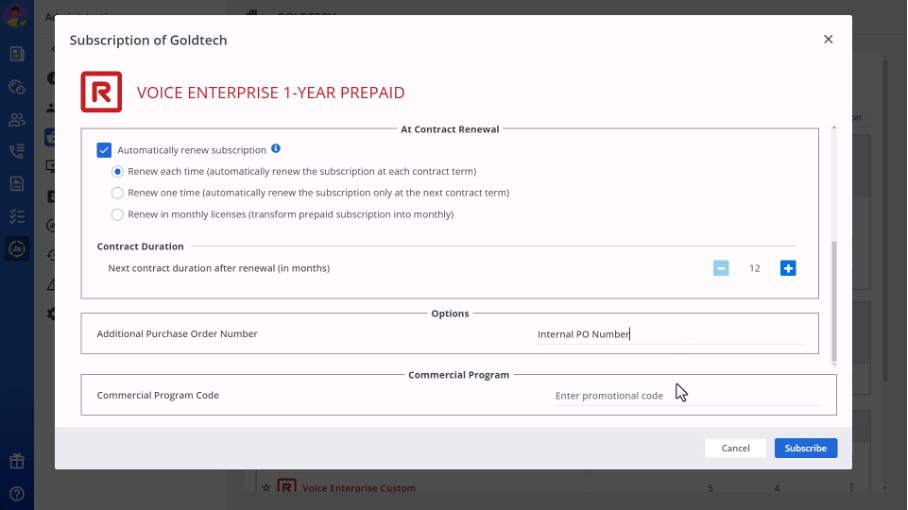
Add a promo code when creating a subscription:
Finance role users or business partners can now enter a promo code while setting up a subscription. We have also added the option for a business partner to obtain a quote (with the WPL price, the discounted amount, and the net amount to be paid) when creating a subscription, taking into account any promotional code. It’s a simple way to apply special offers or discounts right from the start, making onboardings smoother and more cost-effective.
Monitor and manage Rainbow client versions with the new dashboard:
Rainbow now offers partners and customers a dashboard to track which versions of Rainbow clients are in use within their company. This tool makes it easy to identify users running outdated versions, helping to manage software updates and avoid obsolescence, and ensures everyone stays up to date and secure.
Administrators can now delegate device access:
Business partners administrators can now delegate device access to their customers administrators, removing the need for constant business partners involvement. This update is especially useful when end users need to configure settings that Rainbow does not manage. By allowing delegation, updates can be handled directly by end users' admins, saving time and making device management more efficient.